Niloen Backup
Backups you can read, restore with stock tools, and prove restorable — to disk, cloud, and tape as equal targets.
Niloen Backup (short: NBackup) is an open-source backup system written in
Go. It orchestrates GNU tar and a compressor as child processes and produces
immutable, self-describing artifacts that you can copy, inspect, and restore
without NBackup installed — and it doesn’t just store your backups, it
rehearses restoring them (nb drill) and pages you when one fails.
A backup administrator should be able to reason about backups by looking at a sequence of immutable daily backup runs rather than a database of chunks.
The design descends from Amanda — balanced multilevel scheduling, immutable daily artifacts, cycle-based safety — modernized: Amanda is tape-first, while NBackup treats local disk, virtual tape, and object stores (S3, GCS, Azure Blob) as equal targets, and makes the common modern shape — land fast on disk, then replicate offsite — a first-class operation. One static binary, driven by cron: no daemons, no database (the catalog is a cache one media scan rebuilds).
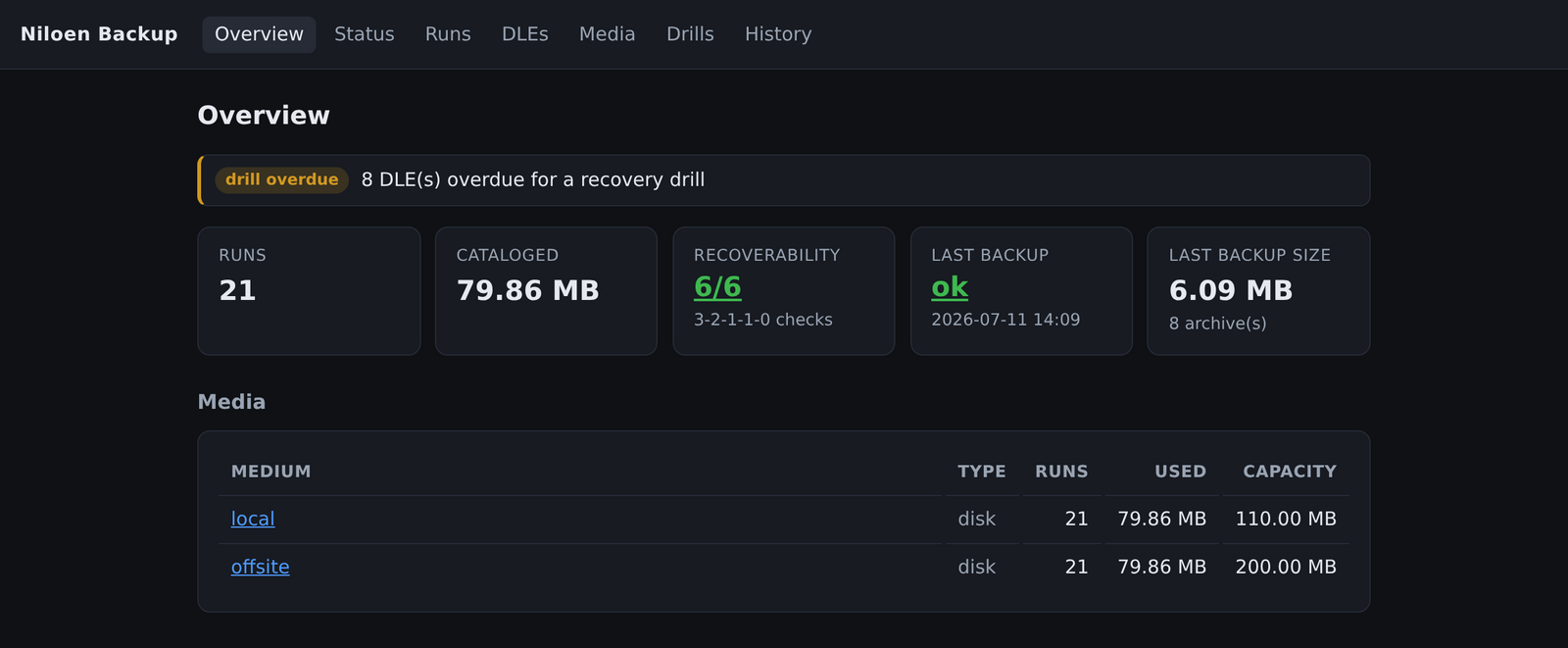
nb web — a read-only dashboard for the whole fleet: recoverability, capacity,
and every run’s placement. Take the tour.
What makes it different
-
Recoverability is proven, not assumed.
nb drillactually restores a risk-biased sample of your data and throws it away, delivering the “0 errors” digit of 3-2-1-1-0. An unattended failure is loud — it exits non-zero and can email or page you. -
Backups you can read. Each run is exactly one immutable directory (or tape span, or set of objects) you can list and understand without any NBackup-specific tooling. A full restores with one pipe:
zstd -dc 000000-app01-home-L0.tar.zst | tar -xf - -
Recovery never requires NBackup. Archives are plain GNU
tarstreams piped through a stock compressor (and, optionally,gpg). The tools that wrote an archive are the tools that read it. NBackup orchestrates; it never invents a format only it can open. -
Disk, cloud, and tape are equal. The same artifact lives unchanged on any medium.
nb copymoves one run between media;nb syncmirrors a whole medium offsite. Land on fast local disk, then replicate to S3 or tape. -
Capacity, not rotation. You give a medium a storage capacity and a cycle (how often each source is fully backed up). The planner chooses backup levels, full frequency, and retention to fit — no balancing knobs to tune.
-
Encryption that keeps copies interchangeable. A dump is encrypted once at the source (via
gpg); verifying integrity and replicating offsite never need the key.
Is NBackup right for you?
NBackup deliberately trades storage efficiency for operational transparency: there is no cross-backup deduplication and no chunk store. If you back up many similar machines or keep long, dense snapshot histories, a chunk-store tool (restic, Borg, Kopia) will store the same data in far less space. What it can’t give you is what NBackup exists for: artifacts a human can read, restores that need no special tool or intact repository, first-class tape alongside disk and cloud, and drills that prove your backups restore. See How NBackup compares for an honest look at both sides.
How a backup is shaped
A volume is an ordered sequence of self-describing files. A run is a set of archives; each archive is its payload, a member index (its file list), and a commit footer (identity, sizes, checksums) written last — so the footer’s presence proves the archive landed whole. On disk it looks like this:
runs/run-2026-06-21.020000/
  000000-app01-home-L0.tar.zst        # clean compressed tar (payload)
  000000-app01-home-L0.hdr            # JSON header sidecar
  000001-app01-home-L0-index.json.gz  # gzipped member list (browse without extracting)
  000002-app01-home-L0-commit.json    # per-archive footer: identity + sizes + checksums
  ...
The same shape maps to an object store (one clean object per file) or tape (the header is a 32 KB block inline ahead of each payload). See Concepts for the full vocabulary and Artifacts you can read.
Where to go next
| If you want to… | Go to |
|---|---|
| Understand why NBackup is built this way | Rationale |
| Install it and run your first backup | Getting Started |
| Learn the vocabulary (run, DLE, cycle, …) | Concepts |
| Read about a specific capability | Features |
| Copy a working setup for your situation | Scenarios |
| Look up a command or config key | Reference |
| Come from Amanda | Migrating from Amanda |
| Compare it to restic/Borg, Bacula, pgBackRest… | NBackup vs the alternatives |
NBackup is free software under the GNU General Public License v3.0, developed and maintained by Niloen AB, a software development consultancy. Copyright © 2026 Niloen AB. Bug reports and questions are welcome on GitHub issues; commercial support is available on request.